Right panel
Jam
The backing-band engine — style, kit, feel, progression presets, and the RHYTHM guitar toggle.
The JAM module is the backing band: bass, pad, an optional rhythm-guitar layer, and an optional "color" layer, all playing the current chord progression.
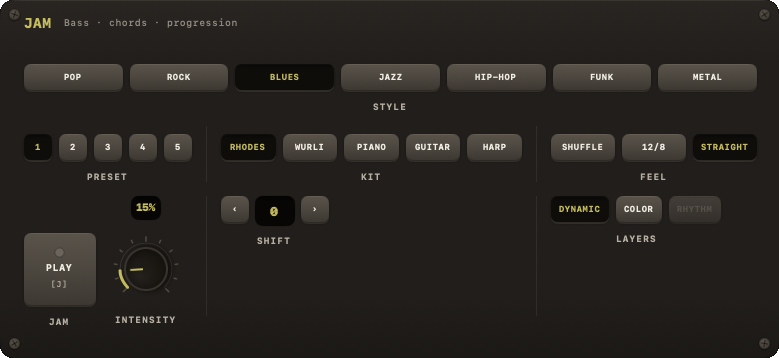
Style
Seven styles — pop, rock, blues, jazz, hiphop, funk, metal — on the STYLE row as POP / ROCK / BLUES / JAZZ / HIP-HOP / FUNK / METAL. Metal plays bare fifths and palm-muted chugs with the downbeat left ringing, at 110–180 BPM. There is no "Ambient" JAM style; Ambient exists only as an FX preset.
| Key | Action |
|---|---|
| J | JAM on/off (under a song: mute) |
| K | Next JAM style |
| E | Editor |
| Key | Action |
|---|---|
| ⌥1 | Pop |
| ⌥2 | Rock |
| ⌥3 | Blues |
| ⌥4 | Jazz |
| ⌥5 | Hip-Hop |
| ⌥6 | Funk |
| ⌥7 | Metal |
Kit
A per-style instrument-set picker (the first kit is each style's default sound):
| Style | Kits |
|---|---|
| Pop | STRINGS, PIANO, SYNTH, RHODES, CHOIR |
| Rock | CLASSIC, PIANO, GARAGE, CLEAN, FRETLS |
| Blues | RHODES, WURLI, PIANO, GUITAR, HARP |
| Jazz | EP, PIANO, GUITAR, VIBES, NYLON |
| Hip-Hop | LO-FI, BOOMBAP, TRAP, KEYS |
| Funk | CLAV, RHODES, SYNTH, PIANO, MUTED |
| Metal | STOCK, DOOM, THRASH |
FRETLS is a trio — fretless bass, guitar and a choir behind them, no pad.
Feel
The same groove list the DRUMS module offers, three per style, remembered per style; metal's three are STRAIGHT · HALF · GALLOP. It is the band's own feel: picking one here changes how bass and pad phrase, and leaves the drums' feel where it is. (The shared swing value is set from the DRUMS feel and the SWING knob.)
Progression controls
- PRESET — numbered buttons over the style's available progressions. Picking one puts the band back on a plain preset progression.
- SHIFT —
‹/›rotate the current progression so it starts on a different chord; the readout shows the offset. Same changes, different place to land — the quickest way to practise a turnaround from the middle. JAM IT resets it to 0 when it imports a track's chords. - BAND pad (J) — starts and stops the band.
- INTENSITY — a 0–100 % knob affecting how busy the arrangement is.
- LAYERS › DYNAMIC — follows the shared section state across all styles (verse → base energy, lift → lift energy), the same concept as DRUMS' DYNAMIC toggle.
- LAYERS › COLOR — a 4th instrument layer (organ, strings or vibes depending on style). It joins in at LIFT; a song or section that sets COLOR on hears it at BASE, HOLD and SPARSE too.
- LAYERS › RHYTHM — adds a strumming rhythm-guitar layer. Only Rock, Pop, Funk and Metal have one; for the other styles the key is dimmed. Its intensity follows the INTENSITY knob.
While a song is loaded
A loaded song holds the band: the JAM plate drops to a single row — the play pad, a DETACH pad and a screen reading SET BY THE SONG — because style, feel and energy follow the song's sections. PLAY still starts and stops the band. See Song.
Per-section overrides
A song is one band with one kit: its style and kit are set once, on the song. What a section sets is how the band plays — its DRUMS lane (on/off, feel, the cymbal in, the fill out, a preset) and its JAM lane (intensity, color, rhythm guitar). These are authored in the progression editor, not in this module, and in the plain-text format as tags such as feel=, fillin=, preset=, intensity= and rhythm= on the section header (see Song text format).