Right panel
Looper
Record a phrase and loop it with the band — REC, PLAY, DUB, UNDO and CLEAR, a length in bars, and why the loop never drifts.
The LOOPER records what you play — post-FX, at the level you hear — and loops it with the band, locked to its downbeat. Lay down a rhythm part, then solo over it.
Note
The looper is back in 0.72 on a new engine — the first one never felt right in time, and this one is sample-locked to the band.
The plate
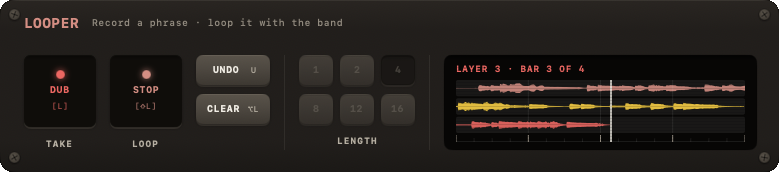
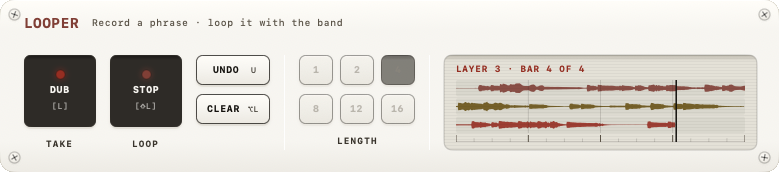
A 3U plate in the right column after JAM. Left to right: the REC pad under TAKE and the PLAY pad under LOOP (the band's PLAY measure), UNDO over CLEAR, the six LENGTH keys in two rows of three, and a screen as tall as the pads with the loop as bars and a playhead over them. Collapsed, the header reads the length (4 BARS) or what the loop is doing.
| Control | What it does |
|---|---|
| LENGTH | Bars per loop: 1 · 2 · 4 · 8 · 12 · 16 — a phrase, a blues, a whole verse. Choose it before you record; it cannot change while a take exists. A length past a minute at this tempo is dimmed. |
| REC [L] | Arms the take: it starts on the next downbeat, so you can press anywhere in the bar. It ends by itself after LENGTH bars and plays straight on. Press again while armed to disarm, while recording to cancel. While the loop plays, the pad reads DUB: a layer from the top of the loop. |
| PLAY / STOP [⇧L] | STOP ramps the loop out; PLAY brings it back on the next downbeat, from its top. |
| UNDO [U] | Takes the last layer back — the one being written, or the last one finished. The take itself stays. |
| CLEAR [⌥L] | Drops the take and every layer. The tempo is free again. |
| The screen | The bars, the playhead, and one line that says what is happening and what the next step is. A click opens the looper big under SESSION, like the tuner; ESC closes. |
The loop's level is the LOOP fader in VOLUME.
Recording
- Pick a LENGTH.
- Press REC. With the band playing, the screen reads
REC ON THE NEXT ONE · 4, and on the one:RECORDING · BAR 1 OF 4. After the last bar the take plays on without a gap, and the screen readsPLAYING · REC ADDS A LAYER. - With the clock stopped, REC starts a fresh clock and the looper counts one bar in on its own click (
COUNT-IN · 4 … 1) — the band does not start. Join it afterwards with SPACE, D or J; it comes in on the one.
The take is recorded after the FX chain and the GUITAR fader, so the loop sounds the way you heard it. It is audio: a new key or chord does not change it, so record in the key you will play in.
Layers
While the loop plays, REC (now DUB) arms a layer from the top of the loop — LAYER 2 FROM THE TOP OF THE LOOP — writes it for exactly one loop (LAYER 2 · BAR 1 OF 4) and then reads 2 LAYERS. Up to four layers in all: the take and three dubs; a fourth dub is refused (FOUR LAYERS IS THE MOST). UNDO takes the last one back, a layer being written included. REC on a stopped loop does nothing — a test loop was once lost to one keypress.
With the band
- SPACE holds the loop with the band and carries it on in place; the screen reads
HELD · SPACE CARRIES ON. - RETURN is "done": the band and the loop stop, the clock resets. A loop playing on its own counts as the band for SPACE and RETURN.
- A stopped loop (
STOPPED · PLAY COMES BACK ON THE ONE) re-enters at the next downbeat, from its top, the way the band does. - The tempo is pinned while a take exists. GRID's BPM refuses, TIME is disabled and the readout says
PINNED · LOOP: the loop was recorded at that speed. CLEAR frees it. A tempo or meter change from anywhere else — a song loading, the wizard — clears the take, and the plate saysCLEARED · TEMPO. A sample-rate change on an engine restart clears it too (CLEARED · RATE); a same-rate restart keeps it, silent for at most a bar.
When REC is off
The reading says why:
| Reading | Meaning |
|---|---|
NO INPUT | Output only — there is no input to record. |
MIC · NO LOOP | The iPad's built-in microphone never reaches the output, so there is nothing to loop. Plug in an interface. |
RATE MISMATCH | Input and output run at different rates: the guitar path is dry and off the band's clock. Fix the rates first — see Sample rate mismatch. |
Why it does not drift
The first looper ran on a wall clock, cut the take on whatever audio buffer came next, re-scheduled the loop point every pass and compensated no latency — and never felt right. The new engine:
- anchors the loop to the band's downbeat as a sample number on the timeline every node in the engine shares;
- writes the take by each buffer's timestamp, not by when it arrived;
- plays back by index arithmetic in a render block — nothing is scheduled, nothing restarts, so the loop point cannot jitter, and STOP, HOLD and PLAY are click-free;
- subtracts the interface's round trip, so a note you heard on the one comes back on the one;
- re-latches the anchor to the downbeat once a cycle, so drift never accumulates.
Measured on an AIR 192|14 at 44.1 kHz: fifteen bars of a one-bar loop against the drums strayed from the loop point by at most 4 samples.
Keys
L records or dubs, ⇧L plays and stops, U takes a layer back, ⌥L clears — a pedal's two switches and its hold, listed with every other key on the shortcuts page. The looper has its own tour: INFO → LOOPER.