Getting started
Audio setup
Choosing input and output devices, why one interface is best, and how NØISE handles device changes.
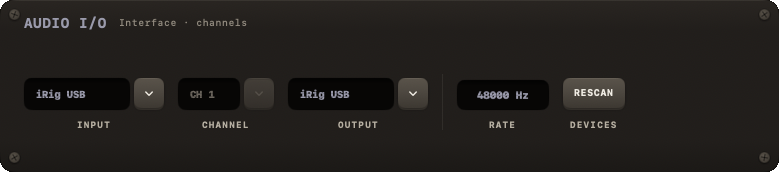
NØISE talks to your Mac's audio hardware through the AUDIO I/O module in the right panel. This page explains how to set it up well; the module's controls are documented in full at Audio I/O.
The one rule: use the same device for input and output
NØISE's audio engine is built on AVAudioEngine, which has a hard limitation: input and output must be the same device to get NØISE's full effects chain and lowest latency. If you use an audio interface, plug your guitar into it and your headphones or monitors into the same interface, then select that one device for both INPUT and OUTPUT.
Using two different devices (say, an interface for input and your Mac's built-in speakers for output) still works for dry guitar and drums, but:
- it commonly introduces a sample-rate mismatch (see below and Sample-rate mismatch),
- effects are disabled whenever the rates don't match,
- and this build only supports a single mono guitar input channel and stereo output — the RATE tooltip in the module says it plainly:
A reading, not a choice: the rate the engine runs at, which is the output device's rate. Change it in Audio MIDI Setup. One device for input and output is the lowest latency; two devices have to run at the same rate.
Steps
Connect your audio interface (or plan to use built-in audio) before launching NØISE, so it shows up during device scanning.
Open the AUDIO I/O module in the right panel (it's collapsed by default — click its header to expand it).
Pick the same device for INPUT and OUTPUT. If you have no input device (or don't want to plug in), choose "None - output only" for INPUT and pick an output device.
If your device exposes more than one input channel, pick the correct one under CHANNEL — this is the channel your guitar/bass is actually connected to.
Check the read-only RATE reading, shown in kHz. It reflects the live device rate; you cannot change it from inside NØISE — use Audio MIDI Setup for that.
Device changes while running
If your audio device disconnects while NØISE is running (unplugged USB interface, sleep/wake, etc.), NØISE detects it, shows RECOVERING AUDIO... across the top of the window, waits a second, and attempts to restart the engine automatically. If that fails, or if microphone access was revoked, the banner turns into an AUDIO ERROR with the reason, a SELECT DEVICE menu and a RETRY button.
Bluetooth
Bluetooth headphones are not recommended: their latency (roughly 100–200 ms) makes real-time guitar monitoring impractical. Use wired headphones or monitors.