Right panel
Drums
Drum genre, feel, energy, and the DYNAMIC toggle that follows your song's sections.
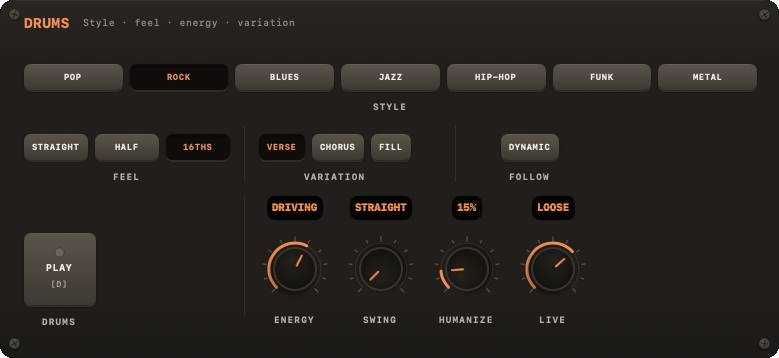
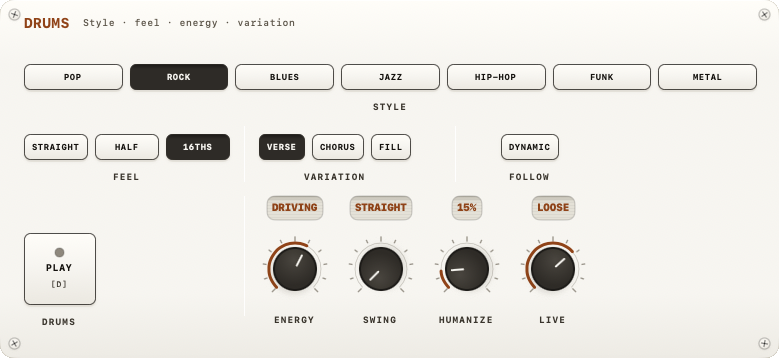
The DRUMS module drives the drum machine: genre, groove feel, and how closely it follows a song's structure. Collapsed, its header reads <genre> · <feel> · <variation>.
Genre
The STYLE row: seven genres, exactly as labelled: POP, ROCK, BLUES, JAZZ, HIP-HOP, FUNK, MTL. Note "HIP-HOP" is hyphenated and fully uppercase, matching the collapsed header too; MTL is the chip for METAL.
Each genre plays its own drum kit from the NØISE Band: rock and metal a power kit, blues a room kit, hip-hop the TR-808, jazz the standard kit, pop and funk the band's own kit.
| Key | Action |
|---|---|
| ⌃1 | Pop |
| ⌃2 | Rock |
| ⌃3 | Blues |
| ⌃4 | Jazz |
| ⌃5 | Hip-Hop |
| ⌃6 | Funk |
| ⌃7 | Metal |
Prev/next genre and the drums' other actions have keyboard shortcuts:
| Key | Action |
|---|---|
| D | Drums on/off (under a song: mute) |
| F | Trigger fill |
| [ | Previous genre |
| ] | Next genre |
| ⌃F | Toggle DYNAMIC (follow sections) |
Feel
A per-genre groove picker offering 3 feels per genre (the first is that genre's default groove). The buttons carry short labels; the full names:
| Genre | Feels offered | Buttons |
|---|---|---|
| Pop | Straight, Ballad, Reggae | STRAIGHT · BALLAD · REGGAE |
| Rock | Straight, Half-time, Driving 16ths | STRAIGHT · HALF · 16THS |
| Blues | Shuffle, Slow 12/8, Straight | SHUFFLE · 12/8 · STRAIGHT |
| Jazz | Swing, Ballad, Bossa | SWING · BALLAD · BOSSA |
| Hip-Hop | Boom-bap, Half-time, Lo-fi | BOOMBAP · HALF · LO-FI |
| Funk | Tight 16ths, New Orleans, Disco | TIGHT · N.O. · DISCO |
| Metal | Straight, Half-time, Gallop | STRAIGHT · HALF · GALLOP |
Picking a feel also sets the clock's swing to what that groove asks for. Metal has no swing: all three of its feels play straight.
Knobs
ENERGY, SWING, HUMANIZE, LIVE, next to the DRUMS play pad (D). SWING is a shared clock value — drums, metronome subdivisions and JAM all follow the same swing setting. A song sets these four per section as a PRESET — STOCK, TIGHT, DRIVING, LAID BACK, LOOSE, SMOKY, QUIET, or your own — see Energy and overrides.
Variation
VARIATION offers VERSE, CHORUS, FILL — pick a variation manually, or turn on DYNAMIC (under FOLLOW) to let the drums follow the song's section changes automatically (verse → Verse variation, lift → Chorus variation, fill section → Fill variation). FILL can also be fired on demand with F or the FILL key in the transport bar; it plays for one bar and then returns to whatever variation was playing before.
While a song is loaded
A loaded song holds the band: the DRUMS plate drops to a single row — the play pad, a DETACH pad and a screen reading SET BY THE SONG — because the genre follows the song's style and the feel, the fills and the four knobs follow its sections. A section's SWING and LIVE land on GRID while the song plays; your own come back when the song is put down. See Song.